With Make.com and Raindrop.io, you can turn your Raindrop bookmarks into a steady stream of BlueSky posts—without manual copying and pasting. By targeting a dedicated Raindrop collection and scheduling your scenario to run at fixed intervals, you effectively create a queue: bookmark as many items as you like, and Have Make.com publish one bookmark per run (for example, every 12 hours).
Below is the basic 3-module workflow:
Prerequisites
- Make.com account
- Raindrop.io account
- BlueSky account
- A dedicated Raindrop collection (e.g. named “BlueSky”)
When you go to add modules, authenticate with your username and password for Raindrop.io and BlueSky.
Step 1: Watch a Single Bookmark per Run
- Create your scenario and add a Raindrop.io module and select "Watch bookmarks".
- Collection: select your “BlueSky” collection.
- Limit: set to 1. This ensures only one new bookmark is retrieved each time the scenario runs, turning your bookmarks into a posting queue.
Step 2: Retrieve the Bookmark’s Notes
Raindrop’s watch trigger returns basic fields only. To include your custom notes, create an API call that will grab your notes from the bookmark. You can pass the ID from module 1 as an argument.
Add the module: Raindrop → Make an API call
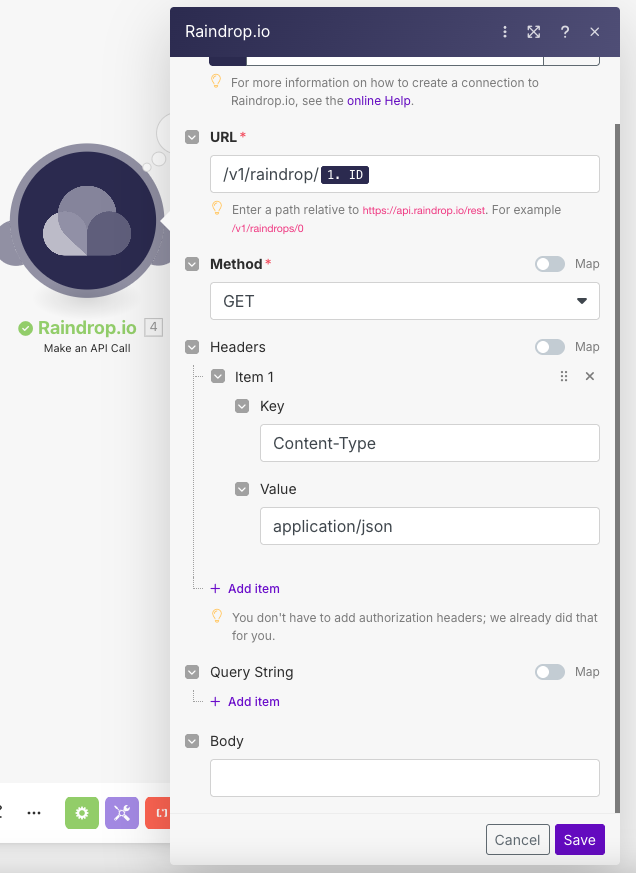
The response contains body.item.note, which can be mapped into your BlueSky post.
Step 3: Create and Publish on BlueSky Module: BlueSky → Create a post
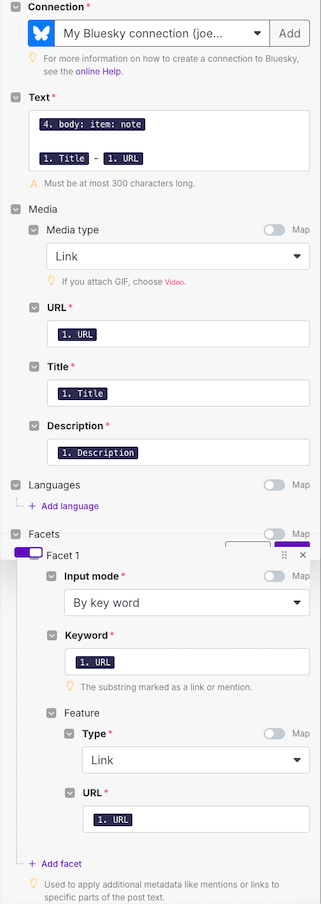
Text: use data pills from the HTTP call, for example:
New bookmark: [2.item.title]
[2.item.link]

Notes: [2.item.note]
In order to get links and link previews working, we need to set up facets.
Facets: Facet 1:
- Input mode: By keyword
- Keyword: 1. URL ← (The substring marked as a link or mention)
- Feature:
- Type: Link
- URL: 1. URL
Here's the full screenshot of how I have it set up.
Scheduling and Queue Management
Scheduling: In Make.com, configure your scenario to run at your chosen interval (e.g. every 12 hours).
Queue behavior: Because the Raindrop “Watch Bookmarks” module is limited to 1 per run, each execution publishes exactly one bookmark. You can bookmark freely throughout the day, and the automation will process them one by one in chronological order.
Testing and Go-Live
Run once manually to verify the output.
Check your BlueSky feed for the test post.
Enable the schedule and let it run unattended.
You now have a reliable, hands-off pipeline that converts Raindrop bookmarks into timed BlueSky posts. Adjust the run frequency and post template to suit your workflow, and you’ll always have fresh content arriving on schedule.